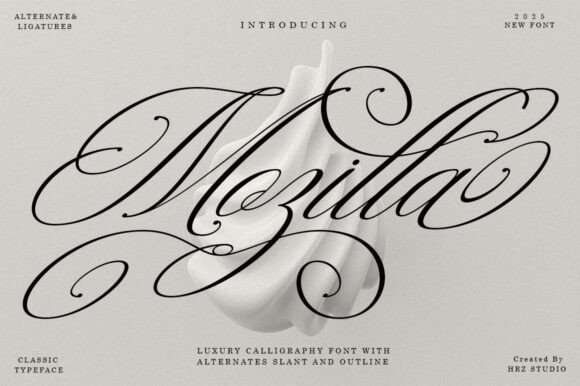
Mozilla Script: More Than Just a Calligraphy Font
In the crowded world of digital typography, finding a typeface that balances ornamental beauty with practical utility can feel like a challenge. Enter Mozilla Script, a calligraphy font that transcends the basic definition of a digital typeface. It is designed to function as a dynamic design asset, featuring characters that shift and change to create a seamless, hand-lettered aesthetic. With its Slant and Outline variations, this typeface captures the essence of a classic copperplate script while infusing it with a modern, energetic touch. It is not merely a collection of letters; it is a tool for adding personality and flow to visual communication.
The Anatomy of a Classic Decorative Script
When you first encounter Mozilla Script, the immediate impression is one of sophisticated fluidity. The typeface is characterized by its high-detail letterforms, which mimic the natural pressure and release of a pointed pen on paper. However, the true strength of this font lies in its connectivity. The kerning and spacing are meticulously calibrated to ensure that letters flow into one another, creating an unbroken line that is both sensual and glamorous. This connectivity is crucial for maintaining the illusion of authentic handwriting, which is often lost in lesser script fonts.
The personality of Mozilla is distinctly feminine and elegant, yet it avoids the trap of being overly fussy or illegible. It strikes a delicate balance: it is ornate enough to feel special, but clean enough to be read at a glance. The inclusion of viable style alternatives for many letters is a significant feature for designers. It allows for the customization of repetitive words, preventing the "digital look" where identical letters appear side-by-side in a static pattern. By mixing these alternatives, you can achieve a truly organic, handcrafted result that feels unique to the specific project.
Strategic Applications: From Branding to Editorial Design
Understanding where to deploy a typeface like Mozilla Script is just as important as appreciating its aesthetic. Because it is a display font, its primary function is to command attention and convey tone, rather than to serve as body text. In the realm of brand identity, Mozilla excels. For entrepreneurs in the beauty, fashion, or lifestyle sectors, this typeface can become the cornerstone of a logo design. The smooth, flowing lines suggest luxury and care, making it an ideal choice for high-end product lines or boutique services.
Beyond the logo, the font’s versatility shines in packaging design and stationery. Imagine a candle label, a wedding invitation, or a boutique greeting card. The classic style of Mozilla Script adds an immediate layer of professionalism and charm. It conveys to the customer that the brand values detail and elegance. Similarly, for publishers and authors, this typeface is a powerful tool for editorial design. It works beautifully for book covers, particularly in the romance, lifestyle, or memoir genres, where the cover needs to whisper the tone of the narrative before the reader even flips to the first page.
Digital applications are equally viable. While you must be mindful of screen resolution, Mozilla Script can elevate web design headers and hero images. It brings a human element to the often sterile digital environment. For social media graphics, where capturing attention in a split second is vital, this font acts as a visual hook. Whether used for a quote graphic on Instagram or a sale announcement on a website, it provides that "stop-scrolling" appeal due to its high contrast and stylish elegance.
Technical Considerations: Readability and Hierarchy
One of the most common pitfalls in using decorative fonts is sacrificing readability for style. Mozilla Script navigates this challenge effectively, but it requires a thoughtful approach from the user. The font is described as "very easy to read," which is accurate for display sizes. However, as a designer or content creator, you must respect the font's limitations. It is not intended for long-form paragraphs or small footnotes. Using it for body text would compromise the visual hierarchy of your design and strain the reader's eyes.
Instead, think of Mozilla as the headline artist. It sets the mood and draws the eye, while a complementary sans serif font or clean serif font handles the heavy lifting of information delivery. This concept of font pairing is essential for maintaining professionalism. A common mistake is pairing a script font with another ornate font; this creates visual chaos. Mozilla Script pairs best with geometric sans-serifs or transitional serifs that offer a clean, structured counterpoint to the script’s organic curves. This contrast ensures that the design remains legible and the hierarchy clear.
Practical Guide to Implementation and Licensing
For those considering Mozilla Script for their next project, the process should begin with a clear understanding of the project's goals. If the objective is to convey warmth, tradition, and elegance, this font is a strong candidate. Before finalizing a design, it is wise to test the font with your specific copy. Pay attention to the connections between letters. If a particular word looks awkward, utilize the stylistic alternates mentioned in the font's features. This manual adjustment is what separates amateur typography from professional design.
When evaluating this typeface, consider the medium. For print design—such as restaurant menus, magazines, and novels—the high detail of the font will reproduce beautifully on textured papers. For digital use, ensure that the font size is large enough to render the fine strokes clearly on various screen resolutions.
Finally, the matter of commercial licensing cannot be overlooked. Mozilla Script is a premium font, and like all design assets, it comes with specific usage rights. Whether you are a small business owner creating your own marketing materials or a freelancer designing for a client, verify that your license covers the intended use. Most licenses distinguish between desktop use (for print), web use (for CSS embedding), and app use. Adhering to these guidelines not only supports the font designers who create these intricate typefaces but also protects your business from legal complications down the road.
In conclusion, Mozilla Script is more than just a creative font; it is a versatile tool for visual storytelling. Its ability to bridge the gap between classic copperplate tradition and modern digital needs makes it a valuable addition to any designer's toolkit. By leveraging its stylistic alternates, respecting its role as a display typeface, and pairing it thoughtfully, you can unlock a level of elegance and engagement that resonates deeply with your audience.